


Key Takeaways
- ConsentFix abuses legitimate OAuth authorization flows in Microsoft Entra ID.
- Attackers gain access tokens without stealing credentials or triggering MFA.
- Detection and response depend on visibility into identity, SaaS, and cloud activity, not traditional prevention alone.
ConsentFix is an OAuth consent phishing technique that steals Microsoft Entra ID access tokens without ever prompting for MFA. It chains consent phishing with ClickFix-style delivery. This attack represents an evolution of consent phishing and ClickFix-style techniques, enabling adversaries to hijack OAuth tokens without stealing passwords or triggering multi-factor authentication (MFA) prompts.
What is ConsentFix?
ConsentFix is a browser-based phishing attack that targets Microsoft Entra ID authentication flows. It tricks users into providing attackers with an OAuth authorization code, which can then be redeemed for access and refresh tokens. These tokens grant the attacker programmatic access to the victim's Microsoft account, including resources in Azure, Microsoft 365, and beyond.
The attack's name derives from its combination of OAuth consent phishing and "ClickFix"-like social engineering, where users are manipulated into performing actions like copying and pasting URLs to "fix" an apparent error. Early variants required manual copy-paste, but improved versions allow drag-and-drop for even easier execution.
How ConsentFix Works: A Step-by-Step Breakdown
ConsentFix exploits the OAuth 2.0 authorization code flow, a standard protocol for secure authentication in native applications like command-line interfaces (CLIs).
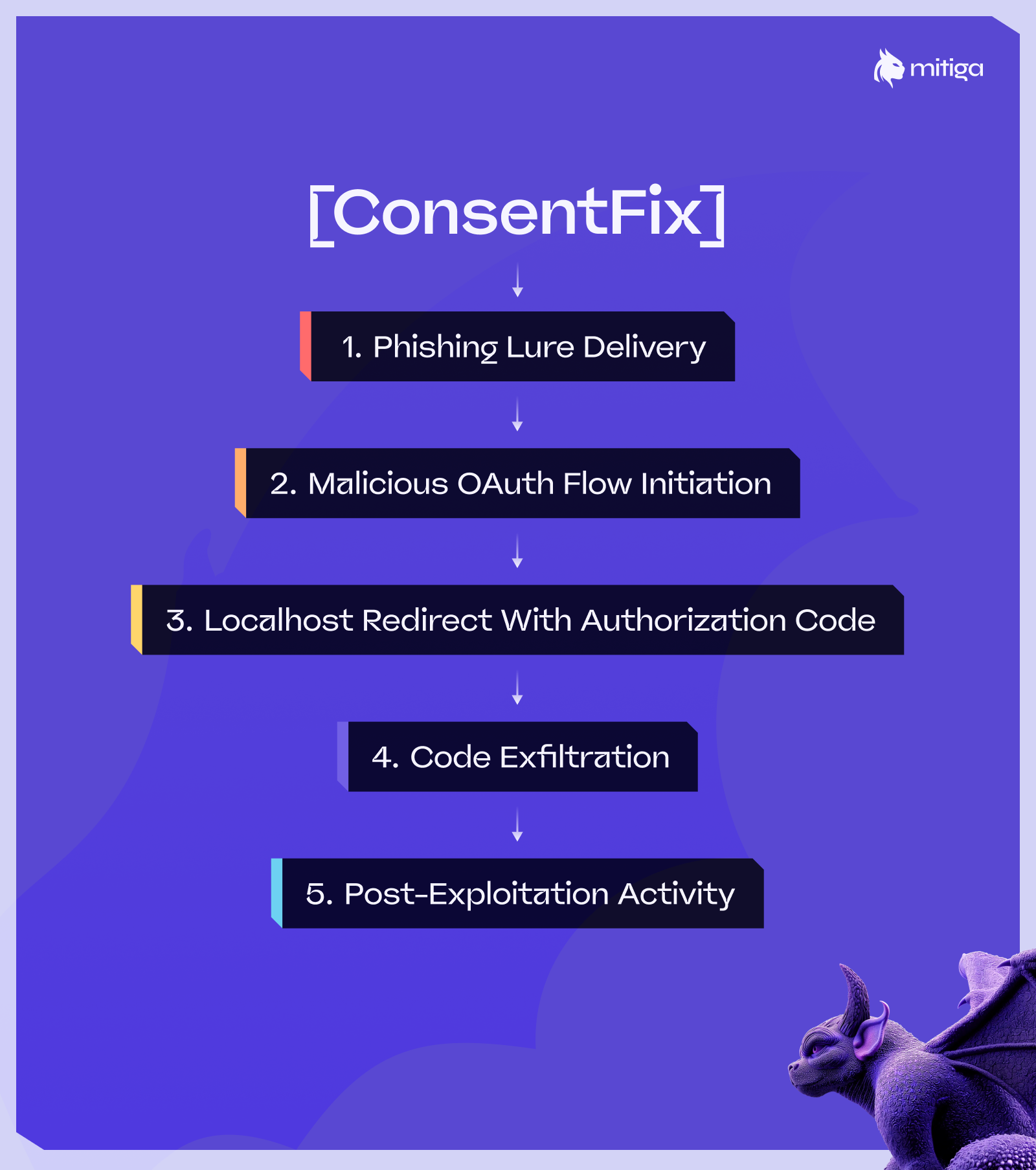
Here's how a ConsentFix attack unfolds:
1. Lure Delivery
The attacker delivers a phishing lure, often via SEO-poisoned search results, malicious ads, or compromised websites. The lure mimics a legitimate scenario, such as a CAPTCHA or login verification, targeting users searching for common terms like "Azure login" or "Microsoft PowerShell fix."
2. Initiating the OAuth Flow
The phishing page crafts a malicious Entra ID login URL for a trusted first-party app, such as Azure CLI (App ID: 04b07795-8ddb-461a-bbee-02f9e1bf7b46). This URL includes parameters like the client ID, redirect URI (localhost), and scopes.
3. Localhost Redirect and Code Exposure
After successful authentication, the browser redirects to a localhost URI (e.g., http://localhost: <random-port>/?code=<authorization_code>). This is a standard behavior for native apps, where the code is meant to be captured locally. However, the phishing page instructs the victim to "fix" an alleged error by copying and pasting (or dragging and dropping) this full URL into a form field on the malicious site.
4. Token Redemption
The attacker receives the authorization code (valid for about 10 minutes) and redeems it via a POST request to Microsoft's token endpoint (https://login.microsoftonline.com/<tenant>/oauth2/v2.0/token). This yields access and refresh tokens, granting the attacker delegated access as the victim.
5. Post-Exploitation
With tokens in hand, the attacker can perform actions like enumerating resources, exfiltrating data, or escalating privileges, depending on the victim's roles.
This attack bypasses Conditional Access policies (e.g., device compliance) because the initial sign-in is legitimate, and token redemption occurs from the attacker's environment. Responding to this activity requires cloud incident response and identity forensics capabilities that can trace how tokens were used, where access spread, and what data was exposed.
First-Party vs. Third-Party OAuth Apps: Key Differentiations
In order to understand why ConsentFix is effective, you must understand the distinction between first-party and third-party OAuth applications.
First-Party Apps
These are developed and registered by Microsoft (e.g., Azure CLI, Azure PowerShell, Visual Studio). They are pre-trusted in every Entra ID tenant, with implicit consent for basic scopes like openid, profile, and offline_access. No explicit consent prompt is shown during authentication, and they cannot be easily blocked or deleted. Localhost redirects are allowed for native flows, enabling seamless desktop/CLI integration. However, this trust makes them prime targets for abuse, as seen in ConsentFix.
Third-Party Apps
These are external applications registered by developers outside Microsoft. They require explicit user or admin consent for scopes (e.g., User.Read, Mail.Send), triggering a permission grant screen listing requested access. Tenants can enforce policies like admin consent workflows or block unverified publishers. Localhost URIs can be configured but are not implicitly trusted, and suspicious consents are more easily flagged.
In ConsentFix, attackers exploit first-party apps' pre-trusted status to avoid consent prompts, inheriting the victim's delegated permissions without raising alarms.
Why ConsentFix Matters: Impact on Organizations
This attack enables full account takeover, potentially leading to data exfiltration and lateral movement across Microsoft 365, Azure, and connected SaaS applications. Without panoramic visibility across cloud, SaaS, and identity environments, these movements often go undetected. It evades phishing-resistant auth (e.g., passkeys) and traditional defenses, as no credentials are stolen. High-privilege users (e.g., admins) amplify risks, but even standard users can expose sensitive Microsoft 365 data.
Mitigation Recommendations for ConsentFix
To effectively defend against ConsentFix, organizations should implement a multi-layered approach that combines technical controls, policy enforcement, and user awareness. Below are detailed recommendations, explained with clear steps and rationale to ensure comprehensive protection:
Enable Token Protection in Conditional Access Policies
This feature binds access tokens to the originating device or session, preventing attackers from redeeming stolen authorization codes on their own systems. It requires Entra ID Premium P1 or P2 licensing. To implement, navigate to the Entra admin center, create a new Conditional Access policy, and enable Token Protection under the "Session" controls. Target it to all users or high-risk groups, and apply it to supported resources like Exchange Online, SharePoint, and Teams. This mitigation directly disrupts the token redemption phase of ConsentFix, rendering stolen codes unusable outside the victim's context.
Restrict Access to First-Party Applications
Limit the use of first-party apps (e.g., Azure CLI, Azure PowerShell) to only necessary users or compliant devices through Conditional Access policies. In the Entra admin center, create a policy targeting specific app IDs (e.g., 04b07795-8ddb-461a-bbee-02f9e1bf7b46 for Azure CLI), and require user assignment, device compliance, or managed networks. This reduces the attack surface by preventing non-admin users from authenticating to these apps, as regular employees rarely need CLI tools. Additionally, consider blocking legacy authentication methods if not required, as they can exacerbate risks.
Enhance User Education and Awareness Training
Educate employees on the specific tactics of ConsentFix, emphasizing that they should never copy-paste or share localhost URLs from untrusted websites, even if prompted to "fix" an error. Incorporate this into regular phishing simulations and security awareness programs, using real-world examples from recent disclosures. Provide clear guidance. If a login process results in a localhost error page, close the browser tab immediately and report it. This human-centric mitigation is crucial, as the attack relies on social engineering to succeed, and informed users can break the chain early.
Implement Continuous Monitoring and Session Revocation
Regularly review Entra ID sign-in and audit logs for suspicious activity, such as non-interactive sign-ins from anomalous IPs. If suspicious tokens are detected, use the Entra admin center to revoke active sessions for affected users. This proactive monitoring ensures rapid response, limiting damage from compromised tokens, and should be integrated into your incident response playbook for quick escalation. These reviews become significantly more effective when token usage, SaaS activity, and cloud actions are automatically reconstructed into a single attack timeline rather than reviewed in isolation.
Why ConsentFix Changes the Identity Threat Model
ConsentFix highlights the risks of implicit trust in OAuth flows, particularly for first-party applications that are broadly pre-approved across Microsoft Entra ID tenants. By abusing legitimate authorization code flows, attackers can obtain access without stealing credentials or triggering MFA, operating entirely within expected authentication behavior.
This technique reinforces a broader shift in identity-based attacks. When authentication succeeds and tokens are valid, many traditional security controls are effectively bypassed. Detection and response then depend on whether organizations can see how those tokens are used across cloud resources, SaaS applications, and identities, and whether they can act before access turns into impact.
By understanding the mechanics of ConsentFix and monitoring OAuth activity beyond the initial sign-in event, organizations can better identify abnormal token usage, investigate identity-driven lateral movement, and respond more effectively. Phishing continues to evolve, and trusted authentication paths will remain a target. Defenses must evolve with them.
When OAuth Attacks Bypass MFA, Posture-based Prevention Isn’t Enough
Ready to see how Mitiga delivers Zero-Impact Breach Prevention? Let’s go.


