


Key Takeaways
- AWS Login attack uses legitimate infrastructure: Phishing URLs originate from amazonaws.com domains, bypassing email filters designed to block suspicious external domains.
- Detection requires CloudTrail analysis: Look for cross-device authentication patterns (client_id = arn:aws:signin:::devtools/cross-device) with mismatched IP addresses between authentication steps.
- Service Control Policies provide complete prevention: Organizations can block the OAuth actions this attack requires without impacting normal AWS operations.
- AI has eliminated traditional phishing indicators: Most modern phishing emails now use AI to generate contextually convincing content that defeats grammar/spelling-based training.
- Technical staff remain highest-value targets: Compromised developer credentials provide immediate access to cloud infrastructure, production systems, and sensitive data repositories.
AWS Login, new authentication process
Just as we began taking stock of the year with beautiful memories and security incidents, AWS introduced a new way to enable developers to use console credentials for AWS CLI.
While the two most common versions were either aws configure followed by Access Key, Secret, and Session Token, or aws sso login, which requires an initial configuration using aws configure sso, with the SSO version being applauded by many developers as the simpler option, AWS gave us aws login. Yes, it's that simple.
To complete the authentication flow, the command opens your default browser and asks you to log in the classic way: email address, password, complete the MFA procedure, and you're done. This sends the credentials back to your CLI, they are cached under the default profile, and that's it. You're all set.
How are we going to access without a browser?
What about EC2? Console-based operating systems? Isn't that why AWS offers them as compute instances? How are we going to authenticate within those instances?
AWS solved that too. Simply add the flag for --remote authentication, copy the URL to a proper browser, log in, copy the verification back to the instance, and you're done.
If that hasn't raised a red flag, I don't know what will. This blog post discusses potential phishing in the new AWS login, highlighting how AWS has introduced another phishing vector.
Let's break it down.
A new phishing method unlocked
When a user triggers the command aws login --remote from their CLI, it creates a request to the AWS authorization endpoint, which creates a dedicated URL. That URL is generated specifically for that instance with a unique device_code.
The user opens the browser and performs authentication on signin.amazonaws.com. This is referred to as cross_device, which tells AWS you intend to take the token to a different device. After authentication, you receive a verification code, a Base64-encoded JWT that contains exactly what AWS needs to sign you in, and submit it back to login. Then you're in.
The blog proceeds by explaining how attackers can leverage the lack of connection between the browser session and the CLI that is requesting credentials.
So we decided to explore this technique further and came away with a few conclusions.
What other parameters are there?
Our first initiative came after understanding exactly what was being requested, what headers were passed, and what the expected response was. We asked ourselves: what parameters can we use? What could go wrong with them?
After exploring --debug, --query, and others, we noticed that AWS left this parameter available for us: --endpoint-url.
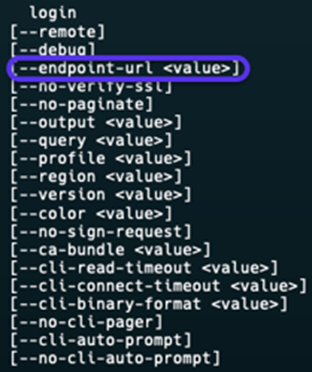
Our next thought was, "Can we direct traffic to our own endpoint?" We attempted this path in this iteration but couldn't get it to work reliably, so it's currently out of scope for the PoC.
Stealing the token, is that an option?
Our second initiative came after we tried to reduce the steps required to get the victim's credentials. Here's the flow we had in mind:
- Victim runs aws login --remote.
- Victim completes authentication.
- Victim gives the attacker the verification.
Conclusion: the device state code attached must match yours.
This proved that, unless we capture the UUID generated from the link by the victim's device via MiTM and manipulate the verification code, we must rely on classic phishing.

Road block, think harder...
Every URL generated from the CLI has an expiration time of 10 minutes. This means phishing like Evilginx2 requires the attacker to be an AiTM to make sure the session doesn't expire and the flow goes smoothly.
As opposed to classic phishing, the authentication is fully browser-based. In this case, we needed to automate the generation of a URL upon every new visitor, tie it to a specific session ID so we could differentiate between profiles, and eventually capture every victim.
And so, we did.
First version
We got a domain and created an identical AWS-themed website, along with a note that the session had expired. That website had JavaScript listeners to communicate with our endpoint and run the command at every login.
That worked. However, thinking like attackers, this wasn't convincing enough. How could we make this phishing attempt more effective?
ConsentFix / ClickFix trap
When we started looking at delivery, we took inspiration from recent ClickFix / ConsentFix phishing campaigns.
These attacks don't just present a fake login page. They create a mandatory-looking action, like "approve this request", "fix this configuration", or "avoid suspension", and wrap it in something that feels like routine IT hygiene.
We applied the same pattern:
- Instead of "please log in here", our page tells victims their AWS session expired and they need to sign in again to restore access.
- Instead of a random domain, we host it on
amazonaws.com, so the whole flow looks like an official AWS maintenance step. - The "fix" of signing in and pasting the verification code is exactly what completes
aws login --remoteon the attacker's side.
In other words, ClickFix shaped not just the technical core of the attack, but how we packaged it so AWS engineers would treat it as another boring security task while it quietly handed over a valid AWS session.
That's not enough. Let's level up
ClickFix-based phishing did compromise many users across many organizations, but it wasn't enough. The setup is messy. The domain isn't convincing enough, even if we had something like amazoon.inc, which costs more than $500 per year and resembles Amazon's domain. The whole process should be easier, more discreet, and managed far away from us.

It got us thinking: if we could leverage the AWS domain, that would immediately increase the chances of convincing victims to fall into our trap.
Why? Less suspicion. People see amazonaws.com and immediately trust it. Classic firewalls and even NGFWs will barely be able to block these domains. NDRs will also be less likely to flag them.
AWS-based phishing, fully leveraged
After some thought, we figured it out.
We started blueprinting it:
- Host the website on an S3 bucket named expired-session, which immediately achieves our goal.
- Set up EC2 to initiate aws login --remote with Lambda, reducing effort, with uptime now AWS-based.
- Lambda fetches the URL and sends it back to the website on S3.
- The victim logs in.
- The token is sent back to the website.
- Lambda sends the token to EC2, and we're in.

We stopped drawing boxes on a whiteboard and actually built it.
Instead of a vague "S3 + EC2 + Lambda" idea, we ended up with a repeatable setup that you can picture and, if you really wanted to, reproduce in a lab.
Here's the exact flow we wired together.
Step 1: Host the phishing page on S3
We needed somewhere for the victim to land. So, we created an S3 bucket, ideally with a related name to appear in the domain such as aws-session-expired, and uploaded our AWS lookalike HTML file, aws_login.html. Permissions are limited to your scope.
This achieved the beautifully crafted domain:
https://aws-session-expired.s3.us-east-1.amazonaws.com
Step 2: Tracking sessions
To differentiate between sessions, we created a DynamoDB table on the backend side with a partition key of sessionId, which represents a unique ID for the victim's browser session and supports multiple victims.
Step 3: Building the Lambda 'bridge'
To communicate with the website frontend, DynamoDB, and EC2 together, we created a Lambda function with a proper IAM role that can:
GetItem,PutItem, andUpdateItemon our DynamoDB table- Call SSM
SendCommandon our EC2 instance - Write to CloudWatch Logs for sanity checks, which is crucial
Using API Gateway, we set up three logical operations that we later exposed as API endpoints:
- POST /start: Generates a new
sessionId, creates a record in DynamoDB with status, uses SSM to send a script to the EC2 instance passing the relevant session ID, and that script runsaws login --remote, captures the URL, and updates the same DynamoDB record. - GET /session/{id}: Reads the DynamoDB item for
sessionId = {id}, returns the current status and available URL. This is what the frontend polls while it waits for the login URL to appear. - POST /token/{id}: Receives the verification code after the victim pastes it onto the phishing page and uses SSM again to send that token down to the EC2 instance.
Step 4: Put an API Gateway in front
To make sure the browser talks to Lambda without exposing any weird internals, we put Amazon API Gateway in front of our function. Pretty simple:
- Created a REST API
- Created three resources
- Enabled CORS so the S3 page could call them from the browser
- Deployed
Step 5: Smooth CLI operator
Eventually, we still need a real aws login --remote command to run and wait for the victim. Keep in mind, this lives for 10 minutes. Otherwise, it expires.
Our first attempt included SSM and a simple SendCommand execution of the login command, which failed.
The reason: SSM is configured to "hit and run". This means that SSM doesn't stick around to see what happens.
We found a workaround: expect. Basically, it allows the command to "expect" an input and respond to it. We downloaded expect and started using it.
After attaching the appropriate IAM role, AmazonSSMManagedInstanceCore, to our EC2 instance, the Lambda function basically does the following:
- Execute
expect aws login --remote - Watch the CLI output and extract the "open this URL in your browser" link
- Write that URL back to DynamoDB for the appropriate
sessionId, or echo it so a wrapper script updates DynamoDB - Block and wait until the verification token arrives
- Once the token is there, feed it into the same
aws loginprocess
Step 6: Wiring
The last step was just plumbing, connecting everything together.
At this point, we stopped talking about a "blueprint" and had a working, AWS-native phishing tool.
.jpg)
What does this actually give an attacker?
At this point, we essentially have an AWS-hosted phishing kit that:
- Lives on legitimate
amazonaws.cominfrastructure. - Automatically generates a fresh
aws login --remoteURL for every visitor. - Ties each URL to a specific victim session.
- Relays the verification token back to our workload and completes the CLI login behind the scenes.
From the victim's perspective, everything looks and feels correct:
- The domain is trusted.
- The login page is pixel-perfect.
- The flow of "Your session expired, please sign in again" feels familiar.
We attached a PoC video of how it works.
It's a new, impactful, and blind phishing technique
This authentication flow is new. Few SecOps teams know this login feature, and most don't know it's enabled in their environment.
As 2025 and early 2026 showed us, successful phishing attacks are far more dangerous and common than many assumed. Salesforce vishing, Scattered Spider using phishing on M&S, DoorDash, and even SoundCloud, Betterment, and Crunchbase all got hit early this year by phishing.
The attacker doesn't bypass your controls. They log in through them.
The impact is immense. Based on the limited public information available, most organization-level compromises and large-scale data exfiltration appear to have started with simple phishing attacks.
In our case, this phishing attack targets tech-savvy employees who work with or on AWS infrastructure. However, it's built on an AWS-owned domain that can't be simply blocked by a firewall rule, displays convincing content that looks AWS-signed, and the authentication really happens on the AWS side, not on some sketchy AWS-like website.
Here's the fun part: once you're in, there's no rush to escalate privileges, move laterally like a thief, or even evade defense mechanisms. This is because many environments, by default, provide permissions that are more than enough to:
- Inventory the environment
- Map out sensitive assets
- Exfiltrate what matters
- Plant a few surprises for later
Persistence and 'business as usual'
The next thing we looked at was persistence, of course, with automation.
With a valid session in hand, an attacker can start laying foundations:
- Create new IAM users with relatively quiet policies
- Generate access keys that never go through your fancy SSO, MFA, or login flow
- Spin up new roles with trust policies that allow principal IDs you aren't monitoring, or from accounts you temporarily added
Even if you rotate the original session out of panic, the damage is already done. The footholds live on.
From there, it's all about blending in, and it can be simple:
- Assume roles you already use for automation
- Move laterally across accounts the user legitimately had access to
- Perform actions that, on paper, look exactly like routine operational activity
Everything runs through official AWS APIs and standard services. No custom implants, no odd binaries on EC2, no shady domains. Just:
- CloudTrail logs confirming, "User X did Y"
- STS sessions that look like every other STS session
- A trail of actions that could just as easily be a tired DevOps engineer on a Sunday night
If you're relying on unusual login alerts and a couple of IP-based rules, this kind of abuse can sit in your environment for a very long time, quietly, comfortably, and fully blessed by your own identity and access model.
Impact, risk, and persistence
What makes this attack especially dangerous is that once it succeeds, there's no obvious "break-in" moment. From AWS's point of view, everything that follows looks like a legitimate user session, because it is. The attacker simply inherits whatever the victim is allowed to do, from read-only access to full administrative control, depending on the user's role.
There's no need for immediate privilege escalation. In many environments, default permissions are already enough to:
- Inventory the environment
- Map out sensitive assets
- Exfiltrate valuable data
- Plant surprises such as backdoors, misconfigurations, or scheduled tasks for later
With a valid session, an attacker can also lay long-term foundations for persistence:
- Create new IAM users with quiet, non-obvious policies
- Generate access keys that never go through SSO, MFA, or the browser-based login flow
- Spin up new roles with trust policies that allow principals you aren't monitoring, or from accounts that were temporarily added
Even if you revoke the original session after detecting something suspicious, the damage may already be done. The footholds remain.
From there, it's all about blending in:
- Assuming roles that are already used for automation
- Moving laterally across accounts the user legitimately had access to
- Performing actions that, on paper, look like routine operational activity
Everything runs through official AWS APIs and standard services:
- CloudTrail logs confirm "User X did Y"
- STS sessions look like every other STS session
- The activity could just as easily be a tired DevOps engineer on a Sunday night
If your defenses rely mainly on unusual login alerts and a few IP-based rules, this kind of abuse can quietly sit in your environment for a long time, doing business as usual with fully blessed identities and permissions.
Prevention: reducing the attack surface using policies
If you want to kill this whole party at the root, you can.
One of the cleaner options we tested was using Service Control Policies, or SCPs, to simply refuse the OAuth sign-in actions this flow depends on:
signin:AuthorizeOAuth2Accesssignin:CreateOAuth2Token
No OAuth sign-in, no remote login magic.
In accounts where cross-device or CLI-based sign-in isn't truly needed, blocking these actions outright can quietly remove an entire class of problems. In more real-world environments where you do need some of this functionality, selectively denying it for specific OUs, accounts, or identities still takes a big bite out of the risk.
It's also worth asking a very boring but very effective question:
Do we actually need cross-device sign-in flows here?
In many organizations, the honest answer is "not really, but it's enabled everywhere because... defaults". If that's the case, tightening where it's allowed, or at least adding proper monitoring around it, is one of those low-drama, high-impact defensive moves.
This is an example SCP that blocks both actions tied to the phishing flow we demonstrated.

Detecting successful phishing events
Let's assume for a moment that prevention isn't perfect, because it never is, and somebody does click the shiny "expired session" link. What would you see?
Identify cross-device remote login usage
When aws login --remote is involved, we repeatedly saw the same fingerprint in CloudTrail:
requestParameters.client_id = arn:aws:signin:::devtools/cross-device
This value should not be common in most environments. That makes it a great starting point for detection.
No cross-device means no remote login trickery, at least via this mechanism.
Look for IP address mismatches
In the phishing scenario, the split is simple:
- The victim authenticates from IP address A, such as their laptop, office, or VPN.
- The attacker completes the verification flow from IP address B, their own infrastructure.
Legitimate remote workflows can also create A not equal to B situations, so you can't blindly alert on every mismatch. But as soon as you combine it with other signals such as cross-device client, unusual geography, odd timing, or weird user agent, it becomes a very strong indicator that someone else is helping with the login.
Correlate sign-in and token exchange events
The interesting part isn't each event by itself. It's the relationship between them.
You want to link AuthorizeOAuth2Access and CreateOAuth2Token events and compare:
- Source IPs
- User agents
- Timing between steps, remembering that the whole device-code flow is time-boxed
In a normal flow, the same human on the same device performs both steps within a short, predictable window.
In our phishing flow, those steps are split across two machines, potentially in two different countries, and sometimes executed suspiciously fast or slow depending on how scripted the attacker is.
We modeled this explicitly in our detections. First, we pulled the cross-device and OAuth-related events into separate datasets.

Then we joined the two DataFrames and filtered on things that don't smell like one human on one machine:
- Different source IP addresses
- Different user agents
- Odd timing gaps between auth and token exchange

After simulating the attack end to end, the detection did exactly what we hoped.
We got a clean alert with the entire activity chain attached: who logged in, from where, and how the token was handed off.
Here's how it looks in Mitiga's CDR platform.

Red Teams, Detection Engineers, and Threat Hunters
We know you want to simulate this attack, see how many developers fall for the trap, and understand exactly how to build robust detections on your side. For simulation resources, detection frameworks, and related tooling, head over to Mitiga Labs, where we publish research, tools, and resources for the security community.
Frequently Asked Questions
What is the AWS login command and why does it matter for security?
AWS introduced the aws login command in November 2025 to simplify developer authentication without requiring manual credential entry or SSO configuration. The feature works great for legitimate workflows—developers simply open their browser, authenticate normally, and the AWS CLI receives credentials automatically. The problem: the --remote flag generates URLs that attackers can send to victims, creating a separation between the device making the CLI request and the device performing authentication. This separation lets attackers intercept credentials while victims see only a legitimate AWS login screen.
How does the AWS login phishing attack actually work?
The attack has six steps: (1) Attackers initiate aws login --remote on their own infrastructure, generating a unique URL. (2) They send this URL to victims via email, claiming the victim's "AWS session expired" or needs "security verification." (3) Victims click the link and see a legitimate AWS login page (because it IS legitimate AWS infrastructure). (4) Victims complete normal authentication with email, password, and MFA. (5) AWS generates a verification code and displays it to the victim. (6) The attacker automatically captures this code and completes their own CLI authentication. The victim believes they successfully logged in, while the attacker now has a valid AWS session.
Can attackers really build this attack using only AWS services?
Yes—and that's the core problem. Researchers built a complete phishing infrastructure using only legitimately available AWS services: S3 hosts the deceptive page, DynamoDB tracks victim sessions, Lambda orchestrates the attack flow, API Gateway provides the interfaces, and EC2 automates the AWS CLI commands. Everything runs on amazonaws.com infrastructure, making it nearly impossible for firewalls and email security systems to block without breaking legitimate AWS access. This is also why traditional "block suspicious domains" strategies fail—the attacker is literally using legitimate AWS infrastructure.
What specific CloudTrail events indicate an AWS login phishing attack?
Look for two events in CloudTrail: AuthorizeOAuth2Access and CreateOAuth2Token, both with requestParameters.client_id = arn:aws:signin:::devtools/cross-device. In legitimate flows, these events occur seconds apart from the same IP address (same person, same device). In phishing attacks, you'll see these events with: (1) Different source IP addresses, (2) Different geographic locations, (3) Inconsistent user agents, (4) Unusual timing gaps. If you see these patterns, an attacker likely compromised that user's credentials.
How does Service Control Policy actually prevent this attack?
Service Control Policies (SCPs) operate at the AWS organization level and deny specific actions before they reach the account-level IAM system. By denying the signin:AuthorizeOAuth2Access and signin:CreateOAuth2Token actions organization-wide, you remove an attacker's ability to complete the phishing flow. If an attacker tries to use a stolen credential to approve OAuth2 access or create an OAuth2 token, AWS denies the request. This completely blocks the attack class while allowing normal AWS authentication (regular login, SSO, API keys) to continue working. There's zero performance impact—it's a hard deny at the identity plane.
What should I do if I suspect I was targeted by AWS login phishing?
Immediately change your AWS password and rotate any active access keys. Contact your security team and provide them with the suspicious email or message URL. Check your AWS login history (available in the AWS console under "Security Credentials" → "Login Activity") for any unrecognized authentication events. Review CloudTrail logs for any API calls you didn't make—attackers often perform reconnaissance immediately after gaining access. Enable AWS CloudTrail alerts and multi-factor authentication on all accounts. Consider running a security scan on your computer to ensure the phishing email didn't install malware alongside the social engineering attack.
Why is AI making phishing attacks harder to detect?
Traditional phishing training taught people to spot obvious indicators: grammar errors, spelling mistakes, impersonal greetings, suspicious urgency. Large language models have eliminated all of these tells. Modern phishing emails now: (1) Use grammatically perfect, contextually appropriate language, (2) Reference real projects, real team members, and real AWS services you actually use, (3) Employ appropriate tone and terminology for your industry, (4) Arrive at optimal times in your workday when you're most likely to arrive at optimal times in your workday when you're most likely to be distracted or rushing to clear your inbox.


